Vector Art using Inkscape
- Jonel Teaño
- Jan 16, 2024
- 1 min read

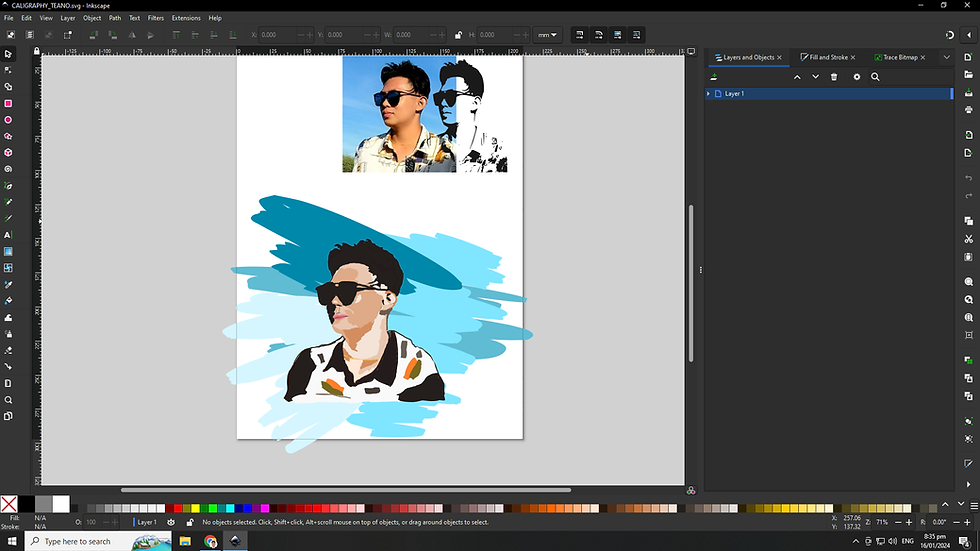
Embarking on a creative venture with Inkscape, I endeavored to craft two distinct vector art pieces inspired by a picture of myself for our activity, each employing a unique tool for a personalized touch. In the first rendition, the Bezier tool took center stage. Navigating through the intricate contours of the image, I meticulously placed anchor points and sculpted curves to create a finely detailed outline. With precision and patience, I breathed life into the vector art, utilizing the Fill and Stroke options to infuse vibrant colors and define the outer edges. As I zoomed in, each anchor point became a brushstroke, contributing to the intricate tapestry of my digital self-portrait.
The second iteration ventured into the realm of expressive strokes with the Calligraphy tool. This tool transformed my vector art into a dynamic display of fluid lines and varying thickness. With each stroke, I captured the essence of movement, adding a touch of spontaneity to the portrayal. The Calligraphy tool allowed me to channel a different artistic energy, bringing forth a vector art piece that celebrated the beauty of imperfections and the organic flow of lines. In this exploration, Inkscape emerged not just as a software but as a conduit for personal expression, turning a static image into a dynamic visual narrative.

Comments